Statistical analyses
To analyze the runtime behavior of decision tables, LF‑ET can statistically evaluate log or log files. This allows an extremely detailed control of the behavior of complex software systems, such as:
-
Which rules (i.e. program branches) has a certain business transaction run through?
-
What contents had selected variables or objects had before each rule was executed?
-
How often have certain rules been run through in total?
-
Which rules have not been run at all?
-
Has the required test coverage been met?
-
How even is the distribution of test cases among the rules?
In order to obtain information on the rule execution that can also be evaluated by machine in log files, this information must be written in a very specific CSV pattern (Comma-Separated-values) in LF‑ET:
-
Name of the decision table
TIP: If the name of the decision table is enclosed in double quotation marks, then the CSV format described here will also be recognized and evaluated if it were written 'anywhere' in a line, which is the rule rather than the exception for output via logging frameworks for example -
Version of the decision table or timestamp of code generation.
-
Number of rules in the decision table
-
Number of the rule for which the program branch is currently being generated
-
Optional: ID of the rule for which the program branch is currently being generated.
-
Optional: Any other information can follow. All variables and objects are at the time of the output still in the state directly before processing by the rule.
Individual values must be separated by comma or semicolon, spaces before or after the values are ignored.
Only lines that match this pattern are statistically evaluated, all other lines are simply ignored.
|
Contents of this chapter: |
Generating CSV information
To write machine-readable CSV information to a protocol file, program the corresponding output in the trace code of the decision table, or centrally in a standard trace code for a group of decision tables.
LF‑ET provides the so-called placeholders for the programming. Placeholders are keywords beginning with "$$”, which are automatically replaced with specific values when the program code is later generated.
-
Name of the decision table ($$EtName or $$DtName).
-
Version of the decision table ($$LastRuleID) or code generation timestamp ($$Version).
-
Count of rules in the decision table ($$Rules).
-
Number of the rule for which the program branch is being generated ($$Rule).
-
Optional: ID of the rule for which the program branch is being generated ($$RuleID).
|
Any further information can be added, separated by a comma or semicolon, after the last value. At the time of trace output, all variable and object content are still in the state they were immediately before processing by the first action of the rule. This information is normally of enormous value in the analysis of runtime behavior (e.g. if problems occur) |
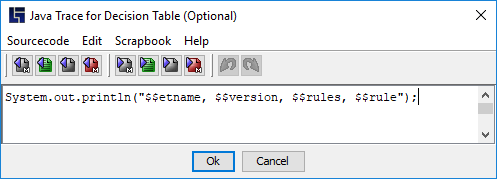
Example of a typical trace code, in this case for Java…
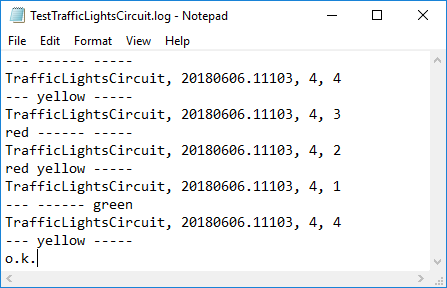
… and the resultant protocol output:
|
Additional information:
|
Starting analyses
The function for the automatic analysis of protocol files is integrated into LF‑ET. In the simplest form, the only additional parameters are the name of the generated protocol file and the name of the Excel file that is to be output:
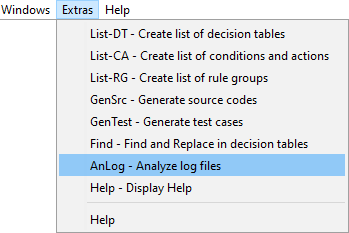
The analysis can also be executed interactively directly from within LF‑ET: Menu bar > Extras > AnLog
Results
The results of the analysis are saved as an MS Excel file. The first sheet, "RulesExecuted”, contains the statistics of executed decision tables and their rules:
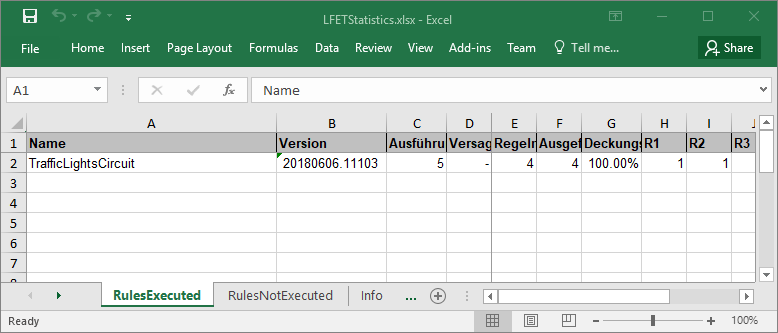
| Column | Meaning of values |
|---|---|
Name |
Decision table name |
Version |
Source generation timestamp or the (technical) version of the decision table. |
executed |
Number of times the decision table was executed. |
Failed |
Number of times the decision table was not executed correctly (it has failed, no rule was run through). |
Rules |
Total number of rules in the decision table. |
executed |
Number of rules executed at least once. |
Level of coverage |
Percentage of rules executed in relation to the total number of rules. |
Rnn |
Number of times rule nn was executed. |
A separate analysis line is created for the decision table version. The key for the “line assignment” comprises three values: name, version and rules. When analyzing protocol files from different runs, it may happen that more than one line is generated for a decision table since there are different versions.
The second sheet, "RulesNotExecuted", gives an overview of all non-executed rules (there are none in this example):
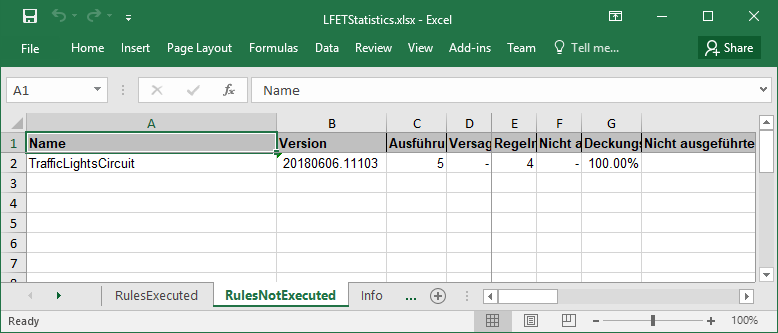
| Column | Meaning of values |
|---|---|
Name |
Decision table name |
Version |
Source generation timestamp or the (technical) version of the decision table. |
executed |
Number of times the decision table was executed. |
Failed |
Number of times the decision table was not executed correctly (it has failed, no rule was run through). |
Rules |
Total number of rules in the decision table. |
Not executed |
Number of rules not executed. |
Level of coverage |
Percentage of rules executed in relation to the total number of rules. |
Not exec. Rules |
Compact presentation of all rules not executed. |
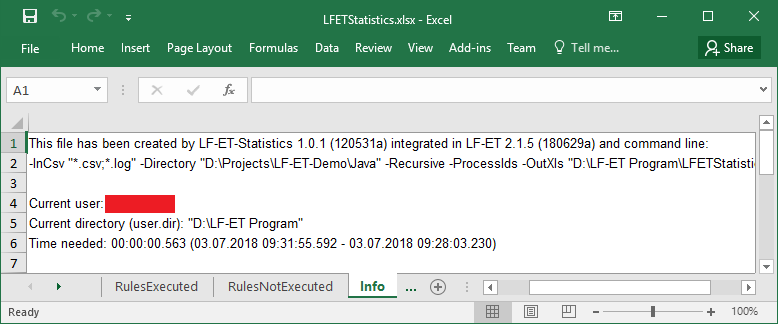
The last sheet, "Info”, contains information about the processing itself, such as the product code, arguments used, user code, working directory, time needed, etc.:
Analysis of rule IDs
Rule ID’s – hereafter called RuleIDs – are, in contrast to rule numbers, stable over a long period of time.
Each RuleID is issued only once in a decision table and each rule retains its ID until the rule changes, i.e. until condition or action values are added or removed.
RuleIDs were introduced with LF‑ET 2.1.3 due to project requirements, to make it possible to analyze the execution or non-execution of very specific rules over long periods and for different decision table versions, such as:
-
Which rules were executed most often in the past six months?
-
Which rules were never executed during the same period?
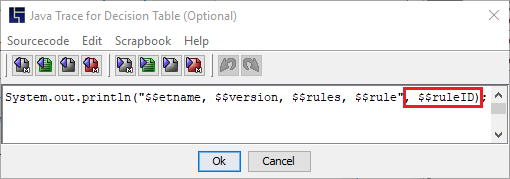
For the RuleIDs to be included in the protocol files for analysis, the placeholder $$RuleID must also be added to the trace code after the placeholder $$Rule , see also section Generating CSV information:
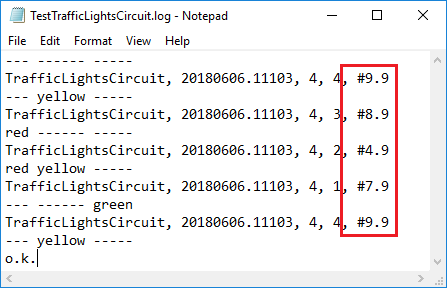
To ensure correct analysis, LF‑ET outputs the RuleIDs in the following format: #nn.mm (nn=RuleID, mm= LastRuleID, the most recently issued RuleID in this version of the decision table):
During the processing of protocol files, the additional analysis of the RuleIDs is triggered via the optional parameter –ProcessIDs:
lfetconsole.bat -anlog TestCompare.log -outxls TestCompare.xls -processIDs
The results are presented on a separate additional "RuleIDs" sheet:
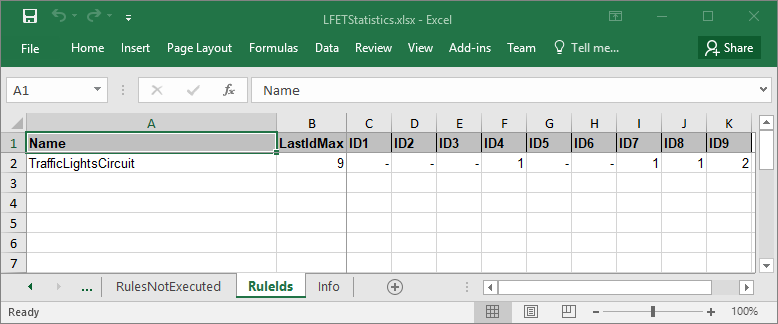
| Column | Meaning of values |
|---|---|
Name |
Decision table name |
MaxID |
The highest LastRuleID, which was found in the processed protocol files for the decision table. |
IDnn |
The number of times the rule with RuleID nn was executed. |
Only one analysis line is created for all the versions of a decision table since only the name of the decision table is used for the “line assignment”.
|
For analysis over longer periods, in the trace code it is advisable to use the placeholder $$LastRuleID (in the sense of the technical version) instead of the placeholder $$Version (code generation timestamp). The "RuleIDs" sheet remains unchanged, but in the "RulesExecuted" and "RulesNotExecuted" sheets there is then a separate line with a full statistical analysis for each “technical version” of the decision table. |