An example
Example for determining valid condition values with numerical operations.
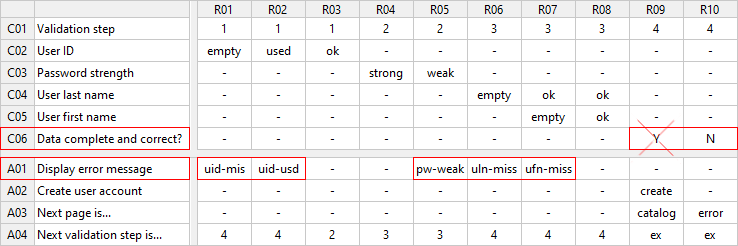
Once any value of action A01 is executed, only value "No" should be valid for condition C06:
-
If errors are found when checking user entries, i.e. if action A01 is triggered, the value "Yes" should no longer be valid for C06
-
Therefore, it should not be possible to execute rule R09 after executing one of the rules R01, R02, R05, R06, or R07
-
On the other hand, rule R10 should only be executable if at least one rule was run with A01
-
Rule sequences that are not executable should not occur in test cases and should automatically be avoided when calculating test cases
-
The problem here is that LF‑ET e.g. cannot autonomously recognize the logical relation between action A01 and condition C06
Special functions are therefore made available which can be used by the test analyst for creating and evaluating logical states in test instructions. A condition value then serves as "valid" and executable if a logical expression, e.g. a numerical comparison, is defined for the condition value and this logical expression is evaluated as "is true".
Solution in 4 steps
Step 1
-
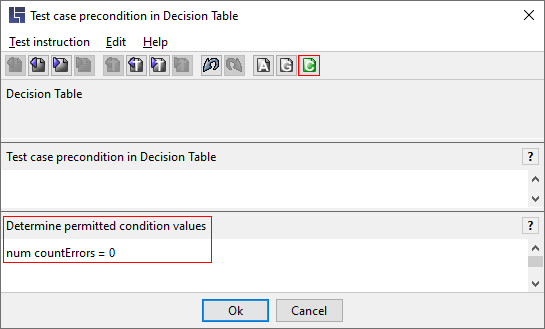
num countErrors = 0 – this instruction is used to create a countErrors variable with the 0 value
-
As this instruction is specified in the precondition for a test case, this is the basic setting for all test cases
Step 2
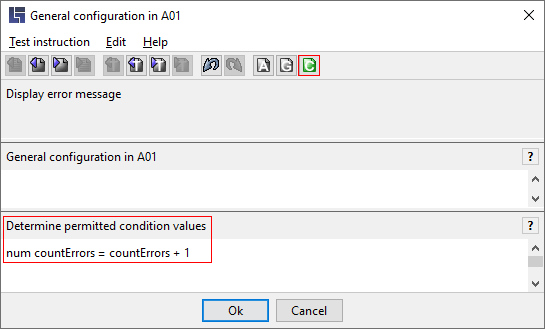
In the general configuration for action A01 – Display error message:
-
num countErrors = countErrors + 1 – this instruction is used to increase the variable countErrors preset for each test case in step 1 by 1
-
This instruction will only run if any value of action A01 (collect errors) is run through in a rule
Step 3
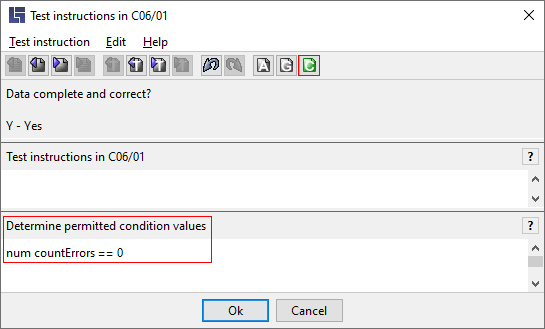
In the test instruction for condition value C06/01 – Data complete and correct? – Yes
-
num countErrors == 0 – "=" is an assignment operator, "==" is a comparison operator, i.e. this instruction triggers no value assignment, rather a check is run to see if the comparison expression is true
-
For condition C06 the condition value "Y" only serves as "executable" (valid) if the numerical comparison is evaluated as "is true"
Step 4
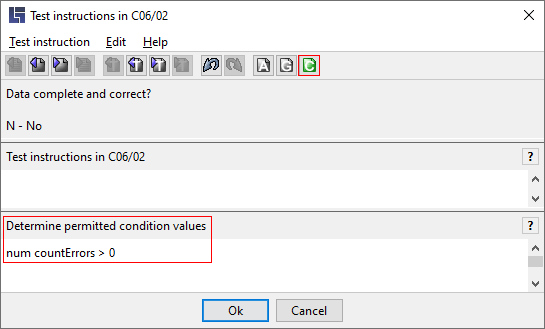
In the test instruction for condition value C06/02 – Data complete and correct? – No
-
num countErrors > 0 – this instruction triggers no value assignment, rather a check is run to see if the comparative expression is true
-
For condition C06 the condition value "N" only serves as "executable" (valid) if the numerical comparison is evaluated as "is true"