Rule IDs
All rules automatically receive internally unique IDs (identification numbers, rule-ID, rule ID)
-
Each rule ID is assigned only once within a decision table and identifies exactly one rule.
-
As long as a rule is not changed, it keeps its ID.
-
If a rule is changed (that is, condition or action values are added or removed), then for that rule, just the rule ID is initially reset to zero.
-
Only when the decision table is saved or when program code is generated are new rule IDs created for all rules whose rule ID has the value zero.
-
The most recently assigned (highest) rule ID is also stored internally (LastRuleID).
Hint: The most recently issued rule ID can be used very well as the technical version number of the decision table. It increases only when rules have actually changed.
-
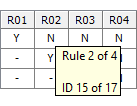
In the tool tip of the rule identifiers, the rule IDs are displayed along with the last assigned (i.e. highest) rule ID:
-
The rule IDs can also be displayed in the rule identifiers, in addition to the rule numbers:
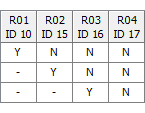
The display of the rule IDs can be switched on and off in the menu bar with the menu item ‘Window > Display IDs’ or in the rule identifier context menu with the menu item ‘Rules > Display IDs’. The selected setting is retained for the user even after LF‑ET is terminated.
-
The rules can also be sorted in an ascending or descending order according to the rule IDs.
These sort orders can be found in the rule identifier context menu under Rules > Sort rules and are applicable when the rule IDs are displayed.
Rule IDs are 'long-term stable' and therefore support a clear and secure communication better than rule numbers. In addition, they enable statistical analyses over longer periods of time, as e.g.:
-
How many times has a particular rule been run in the last quarter?
-
Which rules were not run at all in the last financial year?