Version 2.3.0
Filter rules
With an aid of a new filtering function rules can now be filtered according to any number of complex criteria. Filtering can also be saved as snapshots:
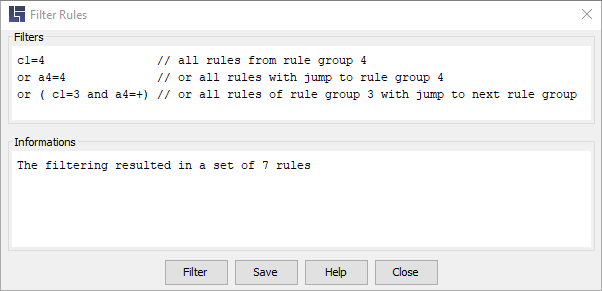
See also: Filtering rules
Backup files
- Automatic zipping
-
All backup files for a decision table are now automatically packed in a ZIP file and only remain unpacked as long as the decision table is opened in LF‑ET.
For more information see: BackupHistoryZip.
- Second, alternative management of backup files
-
If decision tables are located on network drives, annoying delays can occur in rare cases during saving. The management of backup files could be identified as the reason which led to the development of a second, alternative version of backup file management.
For more information see: BackupHistoryVersion.
Simulation of rule processes
- Log and statistical evaluation
-
Individual simulation steps and the rules run are now automatically recorded and evaluated statistically. Logs and statistics can either be saved or deleted once the simulation is completed.
Program generation
- Extracting information from decision tables expanded
-
Takeover of information from decision tables that has so far been available for Java and Groovy has been expanded. In the case of Enum generation for intervals also boolean isInInterval(double/int value) are now being automatically generated.
- Stateless, Generic & Annotations
-
Generation of stateless and generic software modules, as well as the use of annotations, are now supported for Java and Groovy languages.
See also: InterfaceStateless and InterfaceAnnotations.
- Preventing unnecessary new generation
-
In the case of bulk generation, e.g. in the context of CI/CD using the LF-ET-Maven-Plugin, overwriting of already existing and functionally identical software modules can now be suppressed: SkipUnchanged
- Additional languages
-
Newly added functions include generation for Python, JavaScript and TypeScript.
The relevant chapters have not yet made it from the TODO list into the manual; however, should you be interested, we will be happy to answer your queries or provide you with demos and sample projects.
Test Case Generation
- Extended: Export formats
-
LF‑ET supports different test case/test suite export formats so that generated test cases can be documented and their execution recorded in a desired fashion.
Export formats have been expanded, the following are currently available: Gherkin/Cucumber, Robot Framework, TestLink, aqua and Excel.
- New: Data-driven testing
-
If test data are used for test case generation, it is possible that more than one data set is suitable in order to generate a specific test case. With the new option also data-driven test cases can now be generated in addition to recommended test cases.
- Extended: State-based test case generation
-
In the case of "state-based testing" using LF‑ET, a rule is regarded as a transition from one state to another. As regards n-switch-coverage n stands for the number of states between the start and end state of a test case.
Previously, the switch coverage was limited to 0 switch and 1 switch. This limit, however, has been eliminated: LF‑ET now computes the highest selectable switch coverage for each decision table.
Further information: Options for rule groups.
The Project.ini configuration file
- Alternative name: LFET.Project.ini
-
In order for the configuration file to be assigned more specifically to LF‑ET, the "LFET." prefix can now be added to the file name: LFET.Project.ini. It is case-insensitive.
- Alternatives format: LFET.Project.yaml
-
LFET.Project.yaml and Project.yaml are alternative names for the Project.ini file and enable the lightweight markup language YAML to be used instead of the classic property format (key=value).
- Private INI-file for a decision table
-
If LF‑ET, while searching for Project.ini-files for the currently open decision table in the same directory, finds a file with the same name, with the .ini or .yaml ending in addition to the .lfet ending, LF‑ET adds this file as the first in the list of Project.ini-files found.
Further information:
- Decisiontable.lfet.ini
- Search for Project.ini files
- Nesting of Project.ini files
-
Several Project.ini files can now be nested. Individual global settings such as e.g. package definition for Java module, can now be overridden in a sub-folder for a group of decision tables.
Further information: Nested Project.ini.
- Improved search for Project.ini files
-
The search algorithm for Project.ini files has been completely modified and optimized. Rare cases of delays when opening decision tables or when generating programs should now be a thing of the past.