Further information
| In order for the area "Determining valid condition values" to be able to be opened in the test instruction editor, there must be a link to a test instruction subgroup for determining valid condition values. |
These instructions are searched for and processed in the following test instructions:
If in the second value of a condition with precisely two values (i.e. else-value) no logical expression has been found, but it has been found in the first value of this, then the expression found in the first value is inverted automatically – i.e. used with reverse effect.
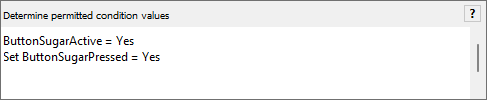
Several logical expressions can also be specified in a test statement, each on a separate line:
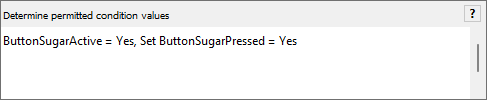
Not recommended, but possible for reasons of backward compatibility: Several expressions in the same row are also possible, they must only be separated with a comma. This is also the reason why commas are not allowed in the expressions themselves:
Empty rows or rows starting with "//", are ignored
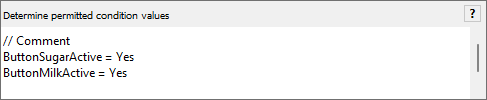
All logical expressions of an instruction are usually linked with "AND", i.e. the evaluation then is considered successful if all expressions have been evaluated as successful. The evaluation is aborted after the first unsuccessfully executed expression.
Also an "OR" argument can be placed between all expressions:
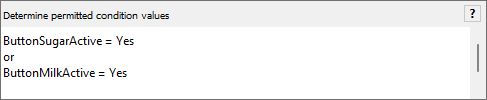
The evaluation is considered to be successfully executed if at least one logical expression has been successfully evaluated. Evaluation is aborted after the first successfully evaluated expression.
A mixture of AND- and OR expressions in the same instruction is not supported at present.
| All details of internal preparation of individual instructions during test case generation can be followed in the determining valid condition values log. |