Adding a test step sequence ID (SID)
As a rule, test instructions are presented in a test case in the sequence in which conditions and actions occur in the decision table. As this sequence does not necessarily match the sequence in which test instructions should follow one another, the sequence of test steps can be managed in LF‑ET with additional instructions.
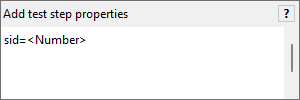
The following expression can e.g. be added in a test instruction:
Example:
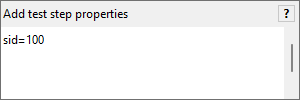
All test instructions for which an SID is configured are sorted in ascending order according to SID, these are followed by all test instructions without an SID that originate from the decision table.
Important: If more test instructions have the same SID, the test instruction originating from the decision table that always comes last in the sequence overwrites preceding test instructions with the same SID. There are, however, cases in which this is desired and arrived at by selecting the relevant SID.
| Though it may seem complex at first sight, it can make a lot of sense to maintain the sequence criteria as otherwise any change to the sequence of conditions or actions can result in a change to the sequence of test steps. Test cases can thus become incomprehensible or no longer executable. An SID can considerably contribute to stable and maintainable test cases. |