Individual project adjustments
During code generation, the generated source code is stored, by default, in the same directory as the decision table and the generation process is thus completed.
In many cases this type of code generation is sufficient, however, if necessary, LF ET can also be adjusted individually to any number of project requirements, such as
-
Other folders for storing generated source codes
-
Automatic transfers and compilation of source codes in target environments
-
Starting of test suites
-
Statistical analysis of workflow
-
Determination of test coverage
-
Preparation and display of test results and statistics
-
etc.
INI files
During code generation, the generated source code is stored, as standard in the same directory as the decision table and the generation process is thus completed.
This mode of code generation suffices in many cases; if necessary, however, LF‑ET can be adjusted to meet any complex requirements, such as e.g.:
-
Other directories for storing generated source code
-
Automatic transfers and compilation of the source code in target environments
-
Starting of test suites
-
Statistical evaluation of runtime behaviour
-
Determining test coverage levels
-
Preparing and displaying test results and statistics, etc.
Global default settings for groups of decision tables can be defined centrally through INI files.
Contents of this chapter:
Standard header
Individual standard information for the header area of source codes of a decision table can be stored in a special INI file. The file name must be as follows:
LFET.<programming language>.Header.Standard.ini.
For example, corporate or project-specific conventions that must be present in each module (for example, copyright information) can be defined here. The standard header is included in the generation at the very beginning of the generated source code.
|
Additional information: |
Standard prolog
If LF‑ET finds the INI file LFET.<Programming language>.Prolog.Standard.ini when generating the source code, the contents of this file are also integrated into the source code before any decision table prolog that may be present in the decision table.
|
Additional information: |
Standard epilog
If LF‑ET finds the INI file
LFET.<Programming language>.Epilog.Standard.ini
when generating the source code, the contents of this file are additionally integrated into the source code after any decision table epilog that may be present in the decision table.
|
Additional information: |
Standard trace
If LF‑ET finds the INI file
LFET.<Programming language>.Trace.Standard.ini
when generating the source code, the contents of this file are additionally integrated into the source code before any trace source code that may be present in the decision table.
|
Additional information: |
Standard error
If no individual error handling is defined in the decision table and LF‑ET finds the INI file
LFET.<Programming language>.Error.ini,
the contents of this file are included in the source code as error handling.
|
Additional information: |
Search for ini files
LF‑ET searches for INI files in several steps:
1. |
The search begins in the directory in which the source code is generated. The search for INI file is run from there in the folder structure backwards to root directory. |
2. |
Subsequently, the search is continued in the directory where the decision table is stored. The search for INI file is run from there in the folder structure backwards to root directory. |
3. |
Then, starting from the current working directory, all folders are searched for an INI file. The “current working directory” is the folder in which LF ET is executed. See: Help > Info > Details > System Properties > user.dir |
4. |
Finally, all folders are searched for INI files starting from the User Home directory. See: Help > Info > Details > System Properties > user.home |
Exceptions:
-
The search for the Project.ini file always starts with step 2.
-
In the Project.ini file a folder can be specified via the key ide.sprache.ini.path, then INI files are only searched for in this folder. The search for INI files can also be completely suppressed here by specifying "".
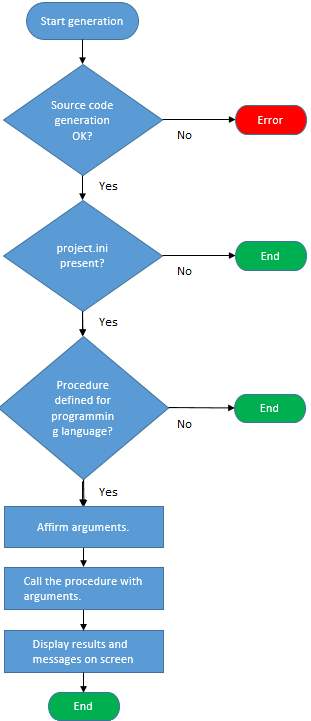
Generation process
The following figure shows generation sequence.
Standard prolog for the interface
If LF‑ET finds the INI file
LFET.<Programming language>.Prolog.Standard.Interface.ini
when generating an interface, the contents of this file completely replace the prolog of the interface otherwise generated as standard by the generator.
Standard prolog for the rules module
If LF‑ET finds the INI file
LFET.<Programming language>.Prolog.Standard.Interface.Dt.ini
when generating an interface rules module, the contents of this file completely replace the prolog of the interface rules module otherwise generated as standard by the generator (Dt - decision table).
Standard epilog for the interface
If LF‑ET finds the INI file
LFET.<Programming language>.Epilog.Standard.Interface.ini
when generating an interface, the contents of this file completely replace the epilog of the interface otherwise generated as standard by the generator.
Standard epilog for the rules module
If LF‑ET finds the INI file
LFET.<Programming language>.Epilog.Standard.Interface.Dt.ini
when generating an interface rules module, the contents of this file completely replace the epilog of the interface rules module otherwise generated as standard by the generator (Dt - decision table).