Saving configuration
Unfolding this area causes information on the currently selected generation configuration to be displayed with the following functions offered: Save, Edit, Copy and Delete:

Tags, in the sense of labels for marking or designating, can be defined for each configuration.
- Hints for specifying tags
-
-
Several tags can be separated with spaces, commas or semicolons
-
If a tag itself contains such separators, it can be placed in single or double inverted commas
-
Inverted commas in tags can be escaped with '\' placed in front
-
Any number of generation configurations can be added to each test instruction group; the configurations are saved directly in decision tables.
During automatic test case generation with several decision tables, the configurations to be used can be purposefully filtered or selected, e.g. through Include- and ExcludeTag parameters. Further information on this topic can be found in the description of the command line mode –GenTest.
This means: e.g. both test cases for automated tests as well as test cases for manual tests can be generated during one test case generation.
An overview of all existing test case generation configurations in a decision table can be found in the Generation menu:
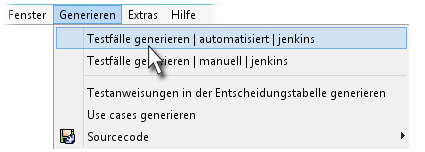
Our sample decision table contains two configurations:
-
A jenkins configuration for the test instruction group automatically
-
A configuration also called jenkins for the test instruction group manually