Test instructions
Test instructions can be provided in a decision table in LF‑ET as text modules from which test cases can be generated automatically.
Access to test instructions is possible in several ways:
-
via the context menu for specific elements of the decision table, the context menu is opened by right-clicking
-
in the value table editor by double-clicking on the row with the desired test instruction, display of test instructions in the value table editor must be activated for this purpose
-
in the test instruction editor by "browsing" to the next or previous test instruction with icons in the icon bar or using the key combinations:
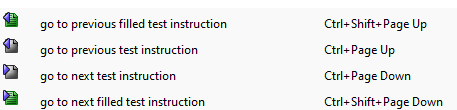
-
using the "global" (i.e. generally effective) keyboard shortcut CTRL+SHIFT+A (Testanweisung, german for test instruction)
A good overview of all test instructions in a decision table is obtained
-
once the decision table is saved as an Excel file; it contains an own sheet with all test instructions in the decision table for each test instruction group
A good overview of all test instruction in any number of decision tables can be achieved by
-
using the "Search and Replace" function: Menu > Extras > Find
-
only by selecting the search option "test value", i.e. deactivating the search for symbols, titles, texts and source codes
-
present output of search results presented as an Excel file
-
once the search has been run, all test instructions found (i.e. not empty) can be effectively searched for, sorted and filtered in an Excel file.