Decision tables
The decision table systematically separates various logical elements into 4 quadrants:

Top left: List of conditions
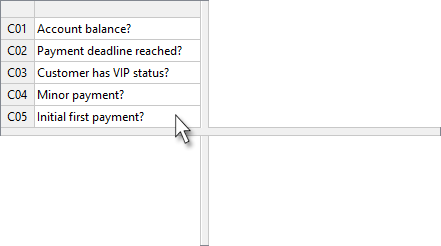
Unlike texts or diagrams, you can see and check the following directly
-
How many and which conditions are used?
-
Are any conditions missing?
-
Are any conditions incorrectly formulated or even superfluous?
Number of cases already apparent!
The list of conditions alone is sufficient to derive the theoretically maximum number of possible case distinctions by multiplying the number of condition values. In our example, this results in 48 cases:
Conditions |
Values |
Cases |
||
|---|---|---|---|---|
C01 |
Account balance? |
<0, 0, >0 |
3 |
3 |
C02 |
Payment deadline reached? |
Y, N |
2 |
6 |
C03 |
Customer has VIP status? |
Y, N |
2 |
12 |
C04 |
Minor payment? |
Y, N |
2 |
24 |
C05 |
Initial first payment? |
IFP, SP |
2 |
48 |
Bottom left: List of actions
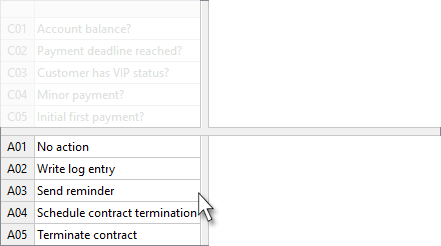
Again, you can check and verify the following directly:
-
How many and which actions are included?
-
Are any actions missing?
-
Are any actions incorrectly worded or even superfluous?
On the right: A rule column for each case
A rule describes which condition or combination of conditions leads to the execution of which action or sequence of actions.
First rule
If the balance is less than zero, only a log entry should be made:
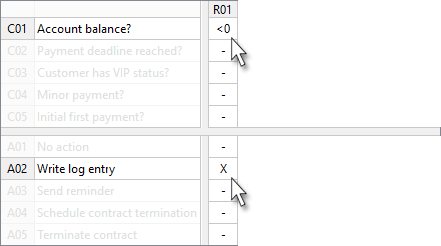
In contrast to the time-consuming creation and maintenance of texts or diagrams, decision tables allow rules to be created or modified with just a few mouse clicks.
|
The minus signs in the rule cells are so called 'don’t care' symbols, they indicate that the respective condition or action is irrelevant in that rule column. Rule columns with conditions marked as irrelevant cover more than one rule. The rule column R01 alone covers already 16 possible condition combinations. |
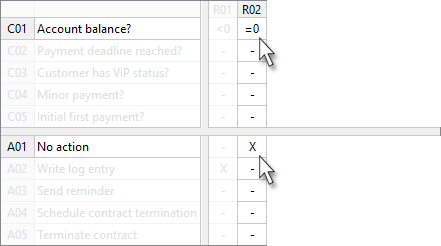
The finished table
With only 8 rule columns, our example covers all possible combinations of condition values. With appropriate tool support including guaranteed completeness, as well as freedom from redundancies and contradictions.
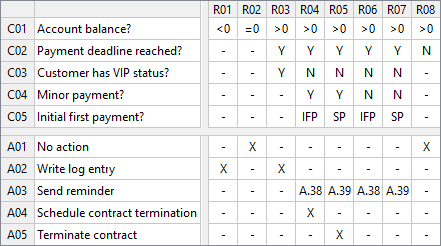
See for yourself how clearly and quickly certain issues can be examined in the decision table — especially in comparison to the text:
-
Under what circumstances is a log entry created?
-
When should no action be taken?
Here is the original text again for direct comparison:
If no balance can be determined, no action is taken. If there is a balance of less than zero (negative credit balance, overpayment), it must be recorded as a log entry. If the payment reminder deadline has not been reached yet, no action is taken even if there is a balance. If a balance greater than zero can be determined and the reminder deadline has also been reached, there is only a log entry made for 'VIP' customers. For all other customers, it must be distinguished whether the outstanding amount is a minor contribution or not:
If the outstanding amount is not a minor contribution, again two possible transaction types must be differentiated:
|
Conclusion
Decision tables have numerous advantages over other forms of presentation when describing logical dependencies:
-
Very compact and clear presentation
-
Very good overview, especially with regard to quantity structures
-
Working with and on the rules is much less strenuous and tiring than in the case of texts or diagrams, for example
-
The easily accessible high level of detail also greatly reduces the risk of misunderstandings
-
Very easy to check by machine, possibly even with automatic addition of missing rules
-
Can also be easily machine-processed: program and test case generation