LF-ET

LF-ET

    • the Decision Table Tool
      • Why use decision tables?
        • Limits of the brain
        • Widely used: Text
        • Equally popular: diagrams
        • Decision tables
      • Why LF‑ET?
        • Easy to learn
        • Software-supported creation of specifications
        • No limits
        • Software generation
        • Test case generation
        • CI/CD
        • Platforms
    • Decision table basics
      • Definition
      • Structure
      • Types
      • Standard logic
      • Testability
      • Decision table combinations
      • Summary
    • Conditions and Actions
      • Insert
      • Move
      • Copy or cut
      • Paste from clipboard
      • Import from clipboard
      • Delete
    • Extended Conditions and Actions
      • When are extended conditions or actions meaningful
        • Compact presentation
        • Avoiding logical errors
      • The value table editor
        • Open value tables for editing
        • Enter values
        • Adjust descriptions
        • Add texts
        • Sort values
        • Move values
        • Keyboard shortcuts for value tables
        • Symbols
      • The 'else value' in the case of conditions
      • Display values
      • Select values in rule cells
      • Copy, cut and paste values
        • Within the same condition or action
        • From one condition to another or from one action to another
        • From condition to action or from action to condition
      • Exchange value tables with other documents
        • Copy value tables from other documents
        • Copy value tables to other documents
        • Export value table as CSV file
        • Import value table from CSV file
      • Display and delete unused values
      • Remove value table
      • Hints for value tables
    • Rules
      • Inserting rules
      • Displaying rules
        • Hiding rules
        • If rules are hidden
        • Hiding and showing empty rows
        • Displaying all rules again
        • Filtering rules
      • Expanding rules
      • Compressing rules
        • Empty conditions
        • Empty actions
        • Identical rules
        • Irrelevant conditions
        • Unused conditions
        • Unused actions
      • Sorting rules
        • Sorting rules in the area of conditions and actions
        • Sorting rules in the rule area
      • Standard sorting
      • Rule numbers and IDs
        • Rule numbers
        • Rule IDs
      • No ELSE rule
    • Rule Groups
      • State Machines
      • Rule group condition
      • Rule group action
        • The exit value
        • The next value
      • Rule group keywords
      • Quick check
    • Basic Functions
      • The Main Screen
        • Memory display
      • Creating a new decision table
      • Data entry
        • Direct entry
        • F2 key
        • Double click
        • Selection from value tables
        • Selection via context menu
        • Auto-completion
      • Select cells, rows and columns
      • Navigation
      • Copying, cutting, pasting
      • Moving rows or columns
      • Deleting cell contents, rows or columns
      • Undoing and redoing
      • Keyboard shortcuts
      • Checking decision tables
        • Run check
        • What is checked
        • Automatic rule addition
        • Automatic check of deci­sion ta­bles
      • Saving decision tables
        • Saving a decision table
        • Backup copies
        • Saving a decision table with a new name
        • Saving an opened backup copy
        • Saving an imported deci­sion ta­ble
      • Saving in other formats
        • Saving as an Excel file
        • Saving as an Excel file, rules as shown
        • Saving as PlantUML, activity or status diagram
      • Opening deci­sion ta­bles
        • Opening a deci­sion ta­ble
        • Opening a backup copy of a decision table
        • List of recently opened deci­sion ta­bles
        • Opening decision tables from LF‑ET 1.x.x
          • Exporting a decision table from LF ET 1.x.x
          • Exporting multiple decision tables from LF ET 1.x.x
          • Opening an exported decision table
      • Read-only decision tables
      • Links
        • Creating links
        • Opening links
        • Links in the case of deci­sion ta­bles
        • Managing links
        • Invalid links
        • Additional functions when opening decision tables
        • The Navigator
          • Starting the Navigator
          • Operation
          • The search function
          • Save graphic
      • Snapshots
        • Create a snapshot
        • Displaying and managing snapshots
        • Snapshot cannot be displayed
      • Comparing deci­sion ta­bles
      • Printing
        • Page setup
        • Automatic format adjustment
        • Print preview
        • Start printing
    • Texts
      • Text editor
      • Overview
    • Simulation
      • Prerequisites
      • Process
      • Linked decision tables
      • Log and Statistics
    • Program generation
      • Two variants
      • The gene­ra­tion menu
      • The protocol screen
      • Further information
        • Generation parameters
          • ide.Default
          • ide.<lang> - The base key for each language
          • BaseOfVersion
          • BasicIndentLevel
          • BracketsNewLine
          • Clean
          • Clipboard
          • ClipboardEncoding
          • ClipboardSuppressFiles
          • CommentsFilePaths­RemoveAllBefore
          • CommentsFilePaths­SuppressProperties
          • DontCheckIntervals
          • DontCheckRuleGroups
          • DtNameLowercase
          • EmptyLines
          • Extension
          • FileName
          • IniFilesEncoding
          • IniFilesPath
          • Interface
            • Interface = true
            • Annotations
            • CommentDtText
            • IgnoreQmark
            • Language
            • Modifier
            • Method­Modifier
            • $$MethodName
            • MethodNames­Extended
            • MethodNames­CamelCase
            • Name
            • PrefixIs
            • PrefixDo
            • RuleGroups
            • RuleID
            • RuleMethods
            • Stateless
            • Trace­BeforeRule
            • Trace­AfterRule
            • Var­name
          • InterfaceRulesClass
            • Annotations
            • Modifier
            • Method­Modifier
            • Name
            • Trace­BeforeRule
            • Trace­AfterRule
            • Vars
          • InterfaceEnum
            • Annotations
            • [ .n ]
            • DefaultValues
            • Arguments
            • Include- and Exclude-Tags
            • Number
            • Options
            • Symbol
            • Title
            • Text
            • CA
            • DT
            • MethodName
            • $$EnumName
            • EnumValueName
          • LfetMinVersion
          • LineSize
          • LogArgDefault
          • Namespace
          • Package
          • ProcedureFile
          • ProcedureArgs
          • Regions
          • ScrapbookSuppressText
          • SkipUnchanged
          • Source­CreateMissingFolders
          • SourceDerivation
          • SourceEncoding
          • SourcePath
          • SuccessControl
          • $$SymbolCase
          • TodoTag
          • Uppercase
        • Placeholders
        • INI files
          • Standard header
          • Standard prolog
          • Standard epilog
          • Standard trace
          • Standard error
          • For interface generation
            • Interface standard prolog
            • Interface standard epilog
            • Rule module standard prolog
            • Rule module standard epilog
          • Search for ini files
        • Error handling (optional)
          • Individual error handling
          • INI file for error handling
        • CI/CD
    • Programming languages
      • Java
        • The Decision Table
        • Demo projects
        • Activate and set up Java
          • Activate Java
          • General confi­gura­tion
        • First results
          • The Interface
          • The Rules module
          • Implementation
            • The model
            • The interface implementation
            • The first test
        • Enums
          • Enum for condition C01
          • Final additions
            • The new interface
            • The new rules module
            • Implementation adjustment
            • Test of the new version
        • Java Gene­ra­tion Para­me­ters
          • ide.Default
          • ide.JAVA - The base key
          • BaseOfVersion
          • BracketsNewLine
          • Clipboard
          • ClipboardEncoding
          • ClipboardSuppressFiles
          • CommentsFilePaths­RemoveAllBefore
          • CommentsFilePaths­SuppressProperties
          • DontCheckIntervals
          • DontCheckRuleGroups
          • DtNameLowercase
          • EmptyLines
          • FileName
          • IniFilesEncoding
          • IniFilesPath
          • Interface
            • Interface = true
            • Annotations
            • CommentDtText
            • IgnoreQmark
            • Language
            • Modifier
            • Method­Modifier
            • $$MethodName
            • MethodNames­Extended
            • MethodNames­CamelCase
            • Name
            • PrefixIs
            • PrefixDo
            • RuleGroups
            • RuleID
            • RuleMethods
            • Stateless
            • Trace­BeforeRule
            • Trace­AfterRule
            • Var­name
          • InterfaceRulesClass
            • Annotations
            • Modifier
            • Method­Modifier
            • Name
            • Trace­BeforeRule
            • Trace­AfterRule
            • Vars
          • Interface.Enum
            • Annotations
            • [ .n ]
            • DefaultValues
            • Arguments
            • Include- and Exclude-Tags
            • Number
            • Options
            • Symbol
            • Title
            • Text
            • CA
            • DT
            • MethodName
            • $$EnumName
            • EnumValueName
          • LfetMinVersion
          • Package
          • ProcedureFile
          • ProcedureArgs
          • Scrapbook​Suppress​Text
          • SkipUnchanged
          • Source­CreateMissingFolders
          • SourceEncoding
          • SourcePath
          • SuccessControl
          • $$SymbolCase
          • TodoTag
        • Summary
    • Test Case Generation
      • Introduction
        • Decision tables as test design process
        • ISTQB Term Definitions
          • Roles in test
          • Equivalence class formation
          • Boundary value analysis
          • State-based testing
          • Data-driven testing
        • Decision tables as a system model
        • Test cases in LF‑ET
      • Test instructions in LF‑ET
        • Test instruction groups
          • Create and manage
          • Subgroups
        • Test instructions
          • Test case preconditions
          • for the decision table
          • for conditions
          • for condition values
          • Intermediate step
          • for actions
          • for action values
          • for unused action values
          • for rules
          • Testcase postcondition
          • Valid and invalid equivalence classes
          • Test instructions with categories
          • Supplementary hints
        • Generate test instructions in the decision table
          • Define range and function
          • Define the Test Instruction
      • Formatting of test instructions
        • Constant test instructions
        • Test instructions with lists
        • Test instructions with intervals
          • Several intervals in a test instruction
          • Automatic recognition of decimal places
          • Thousand separator
          • Leading zeros in output
          • Unlimited intervals
          • Consistency check of conditions
        • Test instructions with elements from the decision table
      • Adding test step properties
        • Test step name
        • Test case tags
        • Test step sequence ID (SID)
        • Test step scope
        • Test step exit state
        • Irrelevant condition
      • Embedding test data
        • Format of data table files
        • Character set, Encoding
        • Linking decision tables with test data
        • Using data from a data table row
        • Functions for dynamic creation of data tables
          • Table - Create a new data table
          • Merge – Add further table rows
          • Row – Reduce to exactly one row
        • Filtering test data
          • by text, numbers or dates
          • by lists
          • by intervals
          • by column values
      • Determining valid condition values
        • with numerical operations
          • An example
          • Example summary
          • Syntax
          • Using calculated values in test instructions
          • Using values from the decision table or from test data
        • with logical expressions
          • An example
          • Example summary
          • <arg1>, <arg2>
          • <operator>
          • Define <arg1>, <arg2>, …​
          • Set <arg1> <operator> <arg2>
          • Clear <arg>
          • <arg1> <operator> <arg2>
          • "is true" and "can be true"
        • Further information
      • Gene­ra­tion options
        • Rule groups
        • Rule selection and sorting
        • Equivalence class partitioning
        • Boundary value analysis
        • Embedding test data
        • Data-driven test cases
        • Export formats of test cases
        • Output file
        • Log files
        • Saving configuration
      • Export formats
        • Robot Framework
          • General settings for a Robot Framework file
          • Preconditions for a test case
          • Conditions and Actions as test instructions
          • Post-conditions for a test case
          • Tags for a test case
        • Gherkin
          • Language setting for keywords
          • Background
          • Tables and multiple row instructions
          • Comments
          • Tags for a test case
        • Excel
        • TestLink
        • aqua
      • Test case generation logs
        • Console outputs
        • Data filtering
        • Permissible condition values
        • Runtime problems
    • Command Line Functions
      • Hints
        • Enabling console tasks
        • Specification of arguments and options
        • 'No Limits' for the number of arguments
        • Extras – Using functions directly in LF-ET
      • Functions
        • List-DT
        • List-CA
        • List-RG
          • Tracking of links
          • Excel output format
          • TaggedTextColumns
        • GenSrc
        • GenTest
        • Find
        • AnLog
    • Further information
      • Searching inside the help
      • The online manual
      • Language settings
      • The LFET.Project.ini file
        • General Keys
          • BackupHistory
            • BackupHistoryFolder
            • BackupHistoryLength
            • BackupHistoryRoot
            • BackupHistoryVersion
            • BackupHistoryZip
          • EmptyActionTitles​Allowed
          • ExpandRulesLimit
          • NestedProjectIni
          • RuleGroupKeyWords
          • SaveAs
            • PlantUML Diagram
        • Keys for program generation
        • Predefined default keys
        • Notes on path information in key values
        • Search for Project.ini files
        • Information on storage location
        • Decisiontable.lfet.ini
        • LFET.Project.yaml
        • Nesting of several Project.ini files
      • The LF-ET.ini file
      • When an error occurs
      • Display problems with Clearcase
    • Release Notes
      • Version 2.4.3
      • Version 2.4.2
      • Version 2.4.1
      • Version 2.4.0
      • Version 2.3.0
      • Version 2.2.1
      • Version 2.2.0
      • Version 2.1.5
      • Version 2.1.4
      • Version 2.1.3
      • Version 2.1.2
      • Version 2.1.1
LF-ET 2.4.3
  • LF-ET
    • 2.4.3
  • LF-ET
  • Basic Functions
  • Opening deci­sion ta­bles
  • Opening decision tables from LF‑ET 1.x.x
  • Opening an exported decision table

Opening an exported decision table

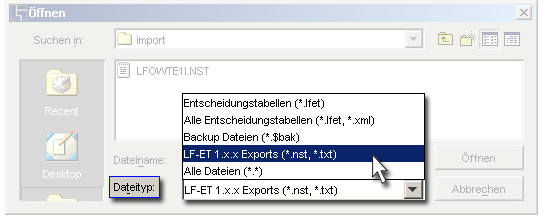
Select File  Open and the file type "LF‑ET 1.x.x (.nst, .txt)".
todo functions 006

Once a decision table is opened from LF‑ET 1.x.x, it is automatically converted to LF‑ET 2.x.x format. All featured information, i.e. texts and source codes, is taken over completely.

Exporting multiple decision tables from LF ET 1.x.x Read-only decision tables

(C) 2026 LOHRFINK software engineering  •  Contact Form  •  Imprint  •  Privacy Policy  •  Picture Credits
This page was built using the Antora default UI. The source code for this UI is licensed under the terms of the MPL-2.0 license.