Subgroups
Test instructions sometimes need to be complemented by further, specialized instructions or properties.
LF‑ET distinguishes 3 types of such additional instructions:
-
Instructions to add test step properties, such as e.g. a test step name
-
Instructions to filter and include test data
-
Instructions to determine permissible condition values
A test instruction group can be linked with up to 3 subgroups. The “Linking to Subgroups" area must be expanded for this:
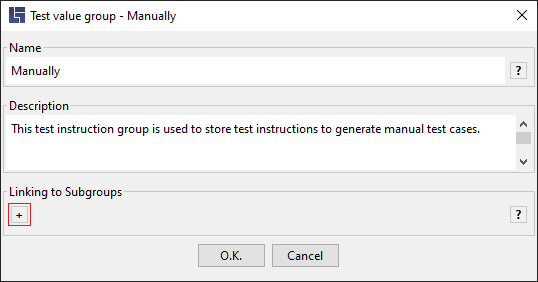
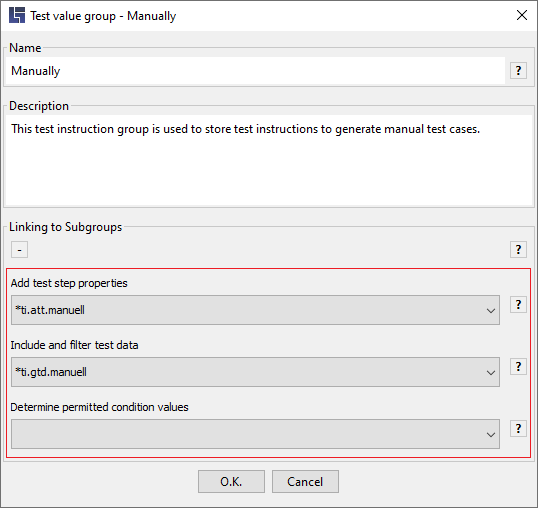
It is determined here which kind of additional information can be used to expand test steps of the group "Manually":
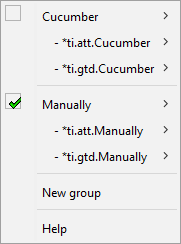
In order to provide a good overview, all linked subgroups are shown in the context menu:
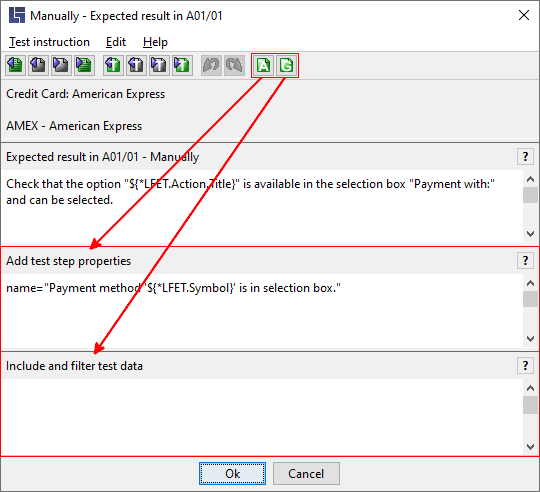
In the test instruction editor, the areas for the individual subgroups can be shown or hidden as required.:
Notes
-
Linked test instruction subgroups can be freely collapsed or expanded in the test instruction editor.
Improved legibility: Quite purposefully, only those instructions can be displayed that should already be processed or looked through.
-
In test instruction groups all rows:
− that are empty or
− that start with //
are ignored.The instructions can thus be determined legibly and provided with comments, if necessary.
-
Reusability: A test instruction subgroup can be linked to any number of "normal" test instruction groups.
-
TIP for a good overview: If a decision table is exported as an Export file, linked test instruction groups are presented together in a sheet next to one another.
-
Subgroups differ from "normal" test instruction groups with an automatically assigned name prefix ("ti" stands for "test instruction"), which also determines the operation area of a subgroup:
Name prefix:
Operation area of a subgroup
*ti.att
*ti.gtd
*ti.check