Functions for dynamic creation of data tables
Often, the test data for a test case must have very specific properties in order to fit the test case exactly. For this purpose, functions for generating and modifying tables with test data can be called in the test instructions:
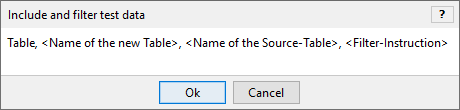
| In order for the area "Creating and filtering data tables" to be unfolded, there must be a link to a test instruction subgroup for embedding and filtering of test data. |
Example
The starting point is a table called “Customers”:
*GTD.Customers

Username            ; Password  ; Vorname  ; Nachname  ; Gender

spoetzsch@gmail.com ; test2049  ; Susanne  ; Poetzsch  ; F
a.karg@google.de    ; test2048  ; Ayse     ; Karg      ; F
hintze@google.de    ; test2050  ; Gangolf  ; Hintze    ; M
gzapf@yahoo.com     ; test2051  ; Grete    ; Zapf      ; F
stoeckel@arcor.com  ; test2055  ; Carl     ; Stoeckel  ; M
The following statement creates a new data table “Testdata” containing all female existing customers:
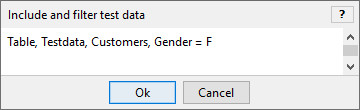
*GTD.Testdata

Username            ; Password  ; Vorname  ; Nachname  ; Gender

spoetzsch@gmail.com ; test2049  ; Susanne  ; Poetzsch  ; F
a.karg@google.de    ; test2048  ; Ayse     ; Karg      ; F
gzapf@yahoo.com     ; test2051  ; Grete    ; Zapf      ; F
Original data tables and newly created data tables
-
Original data tables that are defined in "external" text files are automatically "write-protected" and thus cannot be specified as new (target) data tables
-
In Memory only: Newly created data tables are only temporarily created and stored in the memory of LF‑ET during the calculation of a test case
-
Multiple filtering: Newly created data tables can be filtered with any frequency and can thus also be overwritten
-
Omitting a filtering instruction makes it possible to create a 1:1 copy of a data table
-
Data filtering executed during test case calculation can be reconstructed in a detailed fashion in log files
Multiple data generation functions
-
Multiple data generation functions can be specified for a test instruction; these must only be written in a separate line