Selection via context menu
-
Select the desired cell.
-
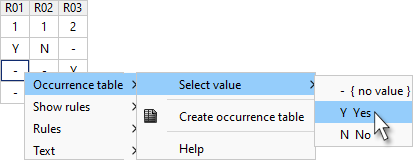
Open the context menu with the right mouse button or with the keyboard shortcut SHIFT+F10 and select Occurrence table > Select value >
-
Mark the desired value in the list of values with the mouse or using the UP and DOWN keys.
-
Paste the selected value into the marked cell by clicking with the mouse or by pressing ENTER.
-
To cancel data entry, press ESC.