Creating test instructions for irrelevant conditions
One or more conditions can be irrelevant for the system behaviour in a rule. It is designated with "-" in a decision table.
It can, however, happen that the tester needs to make entries also for irrelevant conditions which though not needed for decision logic of a specific test case, are still necessary for the correct execution of a function to be tested.
If the test analyst is to develop a test case from such a rule, they must also display the conditions that are irrelevant in order to decide whether these must be made more specific or not.
We call it substantiation of irrelevant condition values below.
Caution: LF‑ET generates additionally a test step for a rule only once the condition has been substantiated.
In order for the test analyst to be able to configure how to proceed with the condition if it has not been substantiated, LF‑ET offers various configuration possibilities.
Tip: In export formats condition values can be found that are used for generating test cases. If there is a tilde before a condition (~), it indicates that the condition value results from substantiation by LF‑ET:
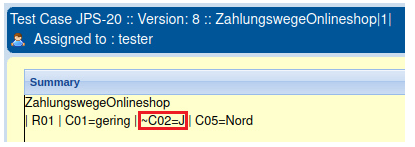
Option in generation dialog
In the generation dialog the creation of test instructions can be triggered overall for all unused conditions with the Generate test instructions also for irrelevant values option:
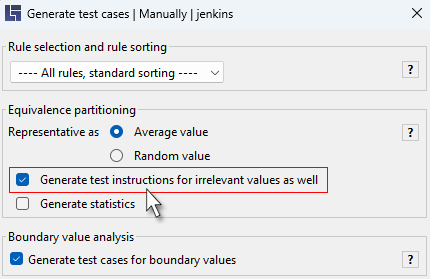
The following applies:
-
For rule groups only those irrelevant conditions are substantiated that are used in at least one other rule group (i.e. have any specific value there)
-
For the creation of test instruction a random value is selected automatically from a range of valid condition values that ensures that the value selected automatically does not trigger any unexpected error message in the test case
Force - overall activation for individual conditions
In order to trigger substantiation for individual conditions in general, the following expression can be added to the test instruction of a condition:
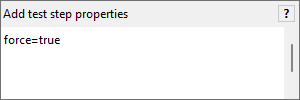
This option works overall, i.e. is applicable:
-
also if the option Generate test instructions also for irrelevant values is not selected in the generation dialog
-
For rule groups also if the irrelevant condition is not used in any other rule of the rule group
-
For the creation of a test instruction a random value is selected automatically from a range of valid condition values_ that ensures that the value selected automatically does not trigger any unexpected error message in the test case.
Hide - overall deactivation for individual conditions
In order to suppress substantiation for individual conditions if they are irrelevant, the following expression can be added to the test instruction of a condition:
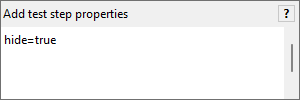
This option works:
-
if the option Generate test instructions also for irrelevant values in the generation dialog is deactivated.