Copy value tables from other documents
2-column tables can be obtained from any documents, e.g. Word or Excel files, by copying to clipboard and pasting into value tables.
Important: The first row is used to determine the nature of the table, e.g. the separator between the first and second column. When pasting into a value table, only those rows that have the same nature as the first row are automatically included later.
Example 1: Copy a table with days of the week from Excel
-
Select 2-column table space:
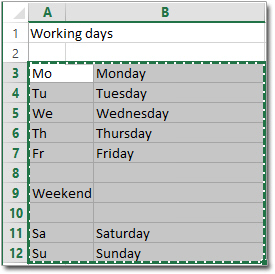
The first row should be the beginning of the area to be copied.
-
Copy the selected area to clipboard, e.g. with the keyboard shortcut CTRL + C.
Example 2: Copy a table with days of the week from Word
-
Select 2-column table space:
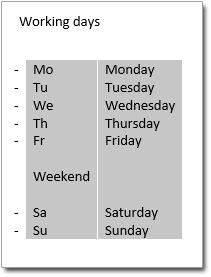
Tip: You can mark any rectangle in Word using the left mouse button and keeping the ALT key pressed.
The first row should be the beginning of the area to be copied.
-
Copy the marked area to clipboard, e.g. with the keyboard shortcut CTRL + C.
Paste the copied tables in a value table
-
The copied values should be inserted in the value table for action A01 after the “X” value.
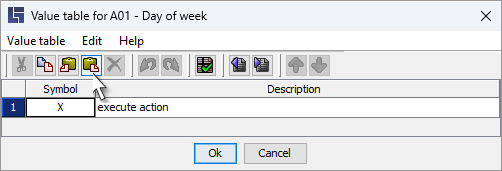
Alternatively, this is also possible with the keyboard shortcut CTRL + V.
-
The original “X” value is no longer needed and can now be deleted.
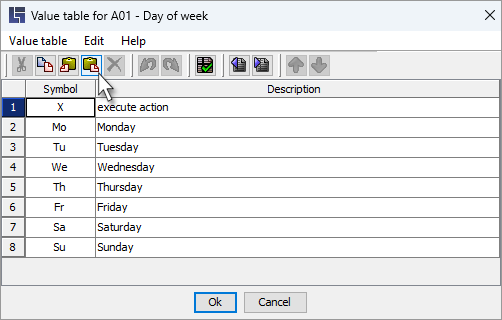
|
It is only checked in the case of existing values whether the description should be updated during copying. Changes to descriptions for the entire table can thus be easily synchronized. |