Memory display
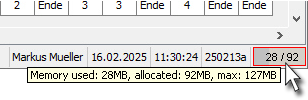
Information on the memory currently used and allocated can be found in the bottom right-hand corner of the main screen.
If you place the mouse pointer on the display, you will get more detailed information on the numbers. In addition, the maximum available memory is still displayed.
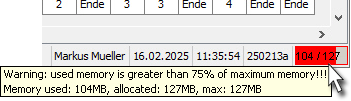
If the memory currently used exceeds 75% of the maximum available memory, the bar will turn red.
If you now place the mouse pointer over the display again, current values and a warning are displayed that the limit has been exceeded.
This rather rare case can occur when large decision tables are opened with many changes being made to them.
The main reason for a high memory requirement is usually the internal storage and care for UNDO-History, which is deleted internally for a decision table only when closing again. The UNDO-History is needed to undo changes or to restore changes that have been undone.
Possible solutions
-
Close all decision tables that are no longer edited or needed.
-
Save and close the decision tables to which many changes have been made and open them again.
-
If the memory problem indicated above has not been solved despite both measures being used: close all decision tables and restart LF ET.