Read-only decision tables
Read-only means that the opened decision table cannot be changed. It is only possible to re-sort the decision table, preview it in print preview, print it and save it with a new name.
Whether a decision table is read-only (i.e. write-protected) or not is indicated by an entry in the bottom left-hand corner of LF‑ET

Automatic write-protection
A decision table is automatically opened as read-only in the following cases:
-
It is a backup file ($ bak extension)
-
It is an imported file
Open as read-only
A decision table is automatically marked as 'locked' (i.e. locked, 'in progress') when opened with LF‑ET. For this purpose, a ‘lock file’ is always created when opening, which has the same name as the decision table, only with the extension '.lfet $ temp’_.
| Information in the lock file |
|---|
|
|
|
|
|
Closing a decision table automatically deletes the associated lock file.
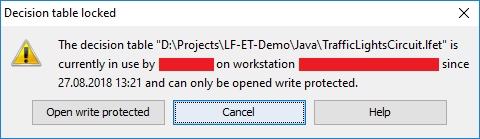
If an existing and active lock file is found when opening, the user receives a hint and the option to cancel opening or to open the decision table in read-only mode.
An existing lock file is ignored in the following cases:
-
If the lock file originates from the current LF‑ET session.
-
If the last update of the lock file was more than 10 minutes ago, an active LF‑ET session will update lock files every 3 minutes.