GenTest – Generate test cases from a set of decision tables
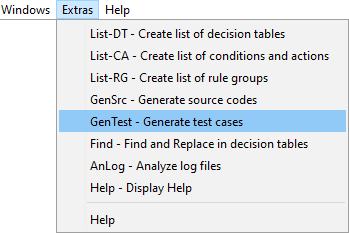
extras menu gen test

Test cases or test suits are ge­ne­ra­ted from any number of decision tables using the -GenTest function:
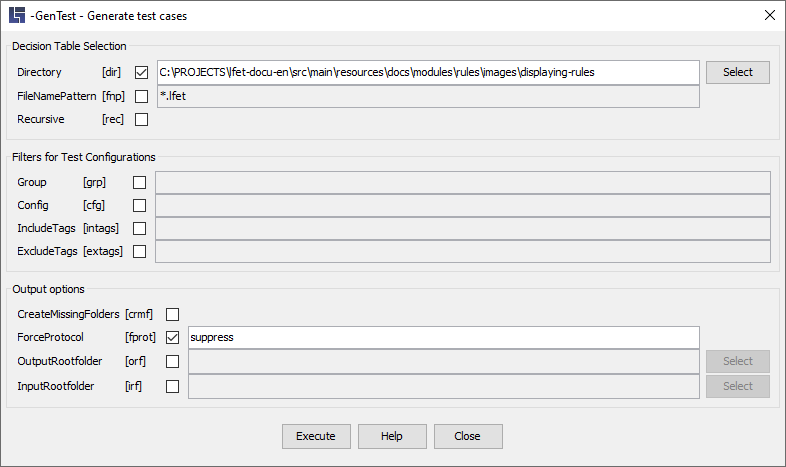
gen test 02

The dialog is subdivided into several sections which are explained in detail in the following chapters.

Selection of decision tables

gen test 03

Parameter [short form]

-Directory"Directory name(s)" [‑dir]

Defines the search area for decision tables starting from the "Directory-Name" directory. It is also possible to specify several directories, separated by the delimiter valid in the operating system (e.g. a semicolon ";" in Windows).

If the directory specification is mis­sing, the current working directory is automatically used.

-FileNamePattern"Name pattern" [‑fnp]

Restriction of the result list to files that match the specified name pattern. You can use the characters "*" (any string) and "?” (just any character) for masking.

It is also possible to specify several patterns, separated by a comma or semicolon.

-Recursive [‑rec]

This parameter causes all subdirectories to be searched, too.

Filtering for test configurations

gen test 04

It is possible to define several test instruction groups with still more predefined test case generation configurations in a decision table.

With an aid of this group of parameters, the configurations to be used for generation can be specified via filter entries:

  • Filters can be used individually or in combinations.

  • If no filters are specified, all configurations saved in a decision table are e­xe­cu­ted.

Parameter [short form]

-Group "Group name" [‑grp]

You can specify here the name of exactly one test instruction group with which test cases are to be ge­ne­ra­ted. It is case-insensitive.

-Config "Configuration name" [‑cfg]

You can specify here the name of exactly one test case generation configuration with which test cases should be ge­ne­ra­ted. It is case-insensitive.

-IncludeTags "List of tags" [‑intags]

One or several tags can be specified as an argument.

All configurations containing one of the tags specified here are used for test case generation with this parameter.

Tags meant as labels for marking can be defined for each test case generation configuration. With this and the next parameter, specific configurations for test case generation can be explicitly selected or excluded from the test case generation.

"List of tags":

  • Several tags can be separated with a blank, a comma or a semicolon

  • If a tag itself contains such a delimiter, it can be placed in single or double inverted commas

  • Inverted commas in tags can be escaped by being preceded with '\'

-ExcludeTags "List of tags" [‑extags]

One or several tags can be specified here.

All configurations containing one of the tags specified here are excluded from test case generation with this parameter.

Output options

gen test 05

Parameter [short form]

-CreateMissingFolders [‑crmf]

Specification of this parameter causes an output directory to be created automatically in case it does not exist yet.

-ForceProtocol [suppress] [‑fprot]

This parameter makes it possible for individual protocol definitions in individual configurations to be overridden "globally":

  • without an argument, protocol files are created for all configurations

  • with the suppress argument the creation of protocol files is suppressed in principle

-OutputRootFolder "Directory specification" [‑orf]

This parameter can be used to specify the "Root Directory" for output files. In order to create the path to output directories, only the path elements "under" the InputRootFolder-directory from the directory of a decision table are used.

-InputRootFolder "Directory specification" [‑irf]

This parameter can be used to specify the "Root Directory" for input files. In order to create the path to output directories, only the path elements "under" the InputRootFolder-directory from the directory of a decision table are used.

Example illustrating RootFolder parameters

OutputRootFolder:
"/opt/jenkins/home/workspace/Deployment_master/target/generated-test-resources/gentest"
InputRootFolder:
"/opt/jenkins/home/workspace/Deployment_master/src/main/resources"
Directory of a decision table:
"/opt/jenkins/home/workspace/Deployment_master/src/main/resources/lfet/domain"
Output directory for the results of decision table:
"/opt/jenkins/home/workspace/Deployment_master/target/generated-test-resources/gentest/lfet/domain"

