Extras – Using functions directly in LF-ET
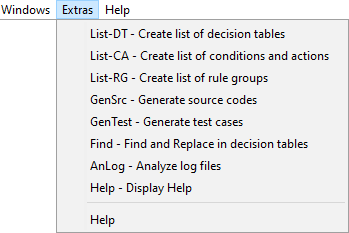
The command line functions can also be used directly and interactively with the LF‑ET interface. Individual functions can be selected in the menu bar under Extras:
A dialog displays all parameters available for the selected function in table form, using the context of the currently or recently opened decision table for value initialization.
Each individual parameter can be selected (i.e. activated or deactivated), the values of parameters (e.g. file or directory names) can be edited.
After all settings have been made, the selected function can be started by pressing "Execute". Details of processing can be tracked 'live' in a log screen.
| The effect of different parameter settings can be very effectively tried in this way. The most appropriate parameter constellation can be copied directly from the log screen and e.g. be pasted into a script. |