External Programming
As an alternative to programming in LF‑ET with the integrated source code editor, all source codes for a decision table can also be fully processed in any development environment, e.g. Eclipse, Visual Studio, JDeveloper, etc.
LF‑ET can generate a special ‘working source code’ for that purpose: the scrapbook.
The same path name and file name are used for the scrapbook as for the final (productive) source code, which is temporarily overwritten, if necessary.
- Work steps for the external editing of source codes
-
-
Generation of the scrapbook from LF‑ET
-
Possibly: Transfer of the scrapbook to the development environment (Only if the scrapbook is not located in the development environment and the transfer has not been performed automatically)
-
Editing of the source codes in the scrapbook with the full functionality of the selected development environment
-
Possibly: Transfer of the scrapbook back to the ‘LF‑ET location’ (Only if the scrapbook is not located in the development environment and the transfer was not performed automatically)
-
Synchronization of all changes by importing the scrapbook back into LF‑ET
-
|
As the same path name and file name are used for importing the scrapbook back into LF‑ET as for the final code, external changes to the productive code, e.g. those caused by refactoring, can easily be synchronized with LF‑ET. |
Contents of this chapter:
What is a scrapbook?
A scrapbook is a fully compilable working source code that contains all source elements that are possible in a decision table:
Individual source elements must be clearly separated by comment lines, e.g.:
To minimize the amount of basic programming work, some of the missing source codes are replaced by predefined statements:
-
The decision table prolog and epilog are filled in such a way that e.g. a class is created with a method
-
condition prologs remain empty, e.g. true is used for missing logical arguments
-
missing source codes for actions are only provided with one TODO comment
All automatically filled source elements are provided with a TODO comment which states that these source elements still have to be adapted to the tasks to be carried out (analyze system statuses, generate system statuses, etc.)
The important thing is: All the programming work can be done completely and without any restrictions in the developer’s customary development environment. Once all adjustments have been made, the changed source elements are read back into the decision table by means of the ‘Read scrapbook’ function and the final application source code can be generated and tested
Generating a scrapbook
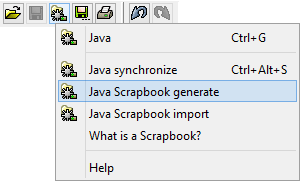
A scrapbook is generated using the “Generate scrapbook” function to be found in the generation menu.
|
Importing a scrapbook
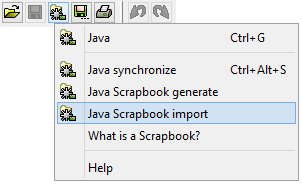
Once you have finished editing the scrapbook, all changes are synchronized as a result of the scrapbook being read back into LF‑ET:
|
Hints and tips:
|
When is it worth using the scrapbook?
Minor changes to source codes that can easily be made without the support of a development environment are best handled directly in LF‑ET using the integrated source code editor.
When bigger or more difficult changes are to be made, or when source elements are created for the first time in a newly generated decision table, it is normally worth taking the ‘detour’ via the scrapbook.