Nesting of several Project.ini files
When LF‑ET finds the key
in a Project.ini-file, the file is then added to the list of INI-files found with the search for other Project.ini files being run further.
When searching for key values, such as generation parameters, INI-files are valued in the order in which they are found. As soon as a value is found for a key, this value is used and the valuation of INI-files is finished.
Individual global settings such as package definition for Java can thus be specifically overridden in a subordinate folder for a group of decision tables.
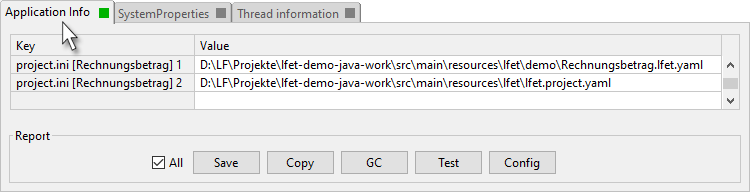
The list of Project.ini-files found including contents is presented in the protocol screen so that the reason for specific generation results can be well traced.
Classic INI files can be freely mixed with YAML files during nesting.
|
You can easily check in the Menu > Help > Info > Details in the Application Info view, which configuration files were found for a decision table and in which order they are evaluated:
|